

CrewCost vs. Sage Intacct Construction
Sage Intacct is a general-purpose cloud ledger Sage bought in 2017 and bolted construction onto. Sold by the seat, implemented by a partner who never leaves, it still needs an AP tool, a time app, a payroll vendor and a Procore connector to do what CrewCost does out of the box.
| Sage Intacct Construction | CrewCost | |
|---|---|---|
| Built for | Every industry; construction added later | Contractors only |
| Job costing | Dimensions and partner-built reports | Cost codes in the ledger, out of the box |
| AP, time, expenses | Third-party tools on top | Included |
| Payroll | Third vendor | Inside CrewCost |
| Procore | Licence plus paid connector | Native, included |
Side by side: what each one does, and how many products it takes
Read the left column as a shopping list. Most of what Intacct is credited with in a demo is a dimension, a report a partner builds, or a third-party tool on top.
| Sage Intacct Construction | CrewCost | |
|---|---|---|
| Job cost structure | Dimensions on a general-purpose ledger, configured by a partner to act like cost codes | Cost codes and cost types as real structure, a subledger of the GL |
| When a cost reaches the job | When someone tags the right dimensions | Every bill, sub pay app, and payroll run posts by default |
| Committed costs | Through the Construction module, set up during implementation | On the budget the day the sub or PO is issued |
| Cost to complete | Reports the partner builds | On every budget line, with gain or fade and ECAC |
| WIP / over-under billing | A report the partner builds and maintains | Automatic. Job costs are a subledger of the GL, so WIP ties out |
| Retainage | Supported in the Construction module | Tracked natively on both sides, through release |
| Accounts payable | Keyed in, or a third-party AP automation tool on top | AI-powered capture, coding and PM approval included |
| Field time & expenses | Employee packs at $1,860 per ten, or a third-party app | Mobile time and expenses included, unlimited users |
| Payroll | Third vendor; hours come back by import | Inside CrewCost; hours by cost code post to the budget with burden |
| Procore | Web Services licence plus a paid connector, $8,000 to $12,000 a year | Native two-way sync, included |
| Multiple entities | Consolidated financials and intercompany automation | Supported; no consolidated financials yet |
| Implementation & users | Partner subscription, about $1,500 a month ongoing; priced per seat | Included; unlimited users |
A generic ledger with construction bolted on. Ask anyone who stayed on Sage 300.
There is a reason so many Sage 100 Contractor and Sage 300 customers have declined the Intacct upgrade for years, and it is not only the price. Intacct was built as a general-purpose financials product and acquired by Sage; construction is a module added later, and it shows. Contractors who evaluated it tell us the same things: the construction features are thin next to what they already have, everything takes too many clicks, and anything that is not stock is a customization project for the partner. Three places that shows up:
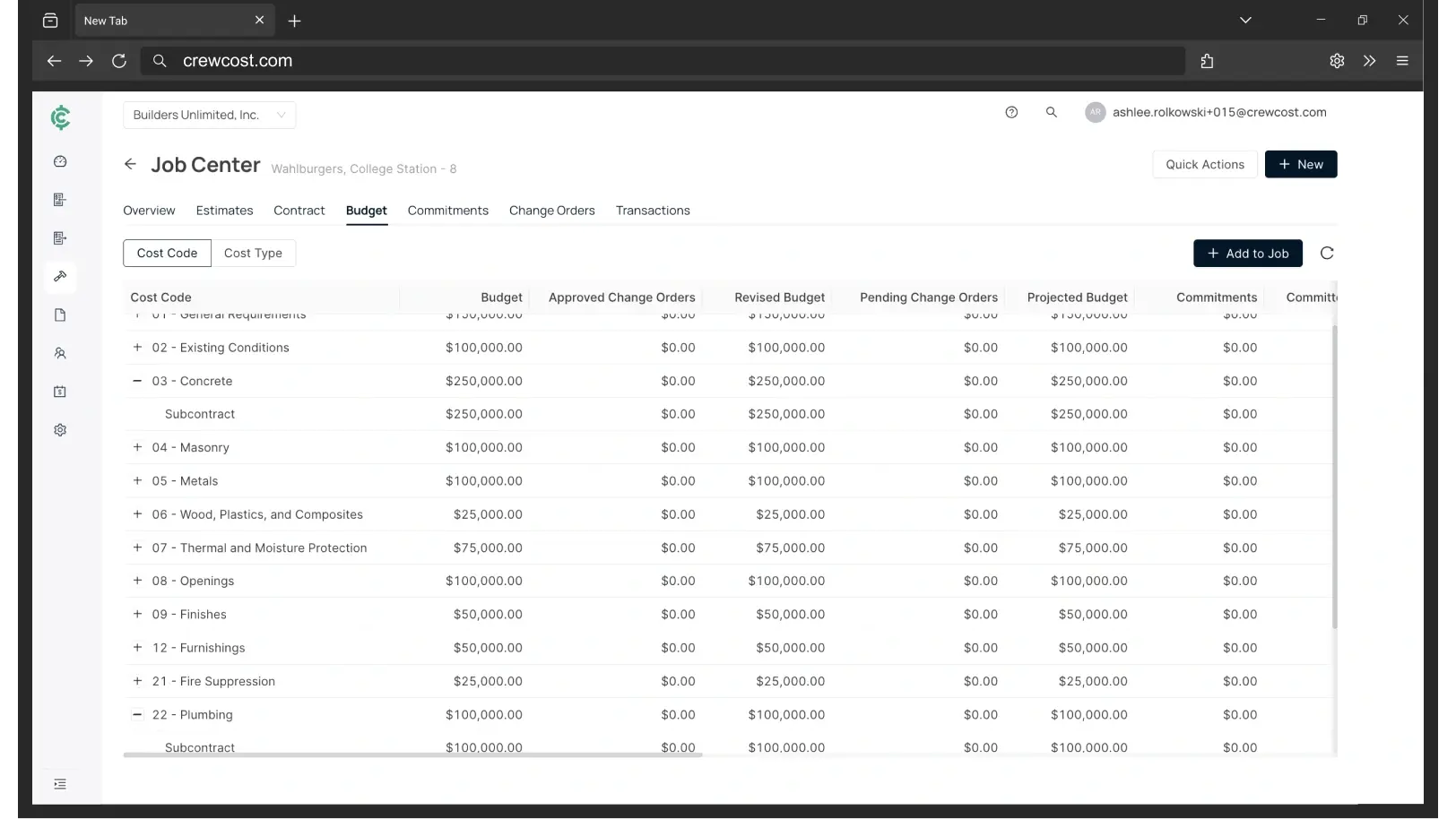
One system, where Intacct needs five
The first-year number is not the number.
Sage does not publish Intacct pricing, but a real quote through a Sage partner does. Applied to an $8M contractor with 18 employees and four people in the office, here is what the same company pays in year one, in every year after, and in CrewCost. Payroll is excluded from all three so they compare like for like, and the Intacct figures are before the AP tool, time app and expense tool a shop adds to match what CrewCost includes.
“We’re now able to track our labor production against our estimated costs automatically.”
Your three options when Sage quotes you Intacct
Questions contractors ask about Sage Intacct
What does Sage Intacct Construction cost?
Sage doesn’t publish it, but the structure is consistent. From a real partner quote: a Construction Essentials package at $14,400 a year with one accounting seat included, $3,480 for each additional accounting user, $960 for each PM or superintendent, $1,860 per pack of ten field employees, a Foundations module at $2,500, a Web Services developer licence at $2,280 for any integration, and a 10% sandbox surcharge. Partner implementation and support run about $1,500 a month, ongoing. That quote came to about $42,000 a year for a single accounting seat before payroll; configured for an $8M contractor it is about $58,000, or $43,000 in year one with the 50% promotion.
Is Sage Intacct built for construction?
Not originally. Intacct was a general-purpose cloud financials product that Sage acquired in 2017; the construction edition came later, built with dimensions and reports on top of the same ledger it sells to nonprofits, software companies and professional services firms. It does consolidation and corporate reporting well. It does not have a native job-cost structure, and the construction workflow is assembled by a partner during implementation.
Why don’t more Sage 100 and Sage 300 contractors move to Intacct?
Price is part of it, but the contractors we talk to say functionality. Things that are one screen in Sage 100 Contractor or Sage 300 become a dimension setup, a report and a partner ticket in Intacct; there are more clicks for a bill, a change order or a pay app; and the field still lives in other apps. The upgrade swaps a server for a subscription and a partner. It does not remove the workarounds, so many shops have stayed put.
Is Sage Intacct the same as Sage 300 CRE or Sage 100 Contractor?
No. Intacct is a separate cloud product Sage acquired and built a construction edition on top of. It is where Sage steers Sage 300 and Sage 100 Contractor customers who want the cloud, and it is priced for a much larger company than most of them are. If you are on 300 or 100 Contractor, our Sage 300 and Sage 100 Contractor comparisons cover that move directly.
Why is Intacct implementation a monthly fee?
Because Sage sells Intacct through partners, and partners sell a customer success plan: implementation, training and support bundled into a subscription that continues after go-live. On the quote we worked from that was $1,500 a month with no end date. CrewCost includes implementation in the price and does the data mapping with you.
Does CrewCost handle multiple entities?
Yes: you can run several entities in CrewCost. What we do not do yet is consolidate their financials into one set of statements, which is where Intacct is strong. If consolidated reporting and intercompany automation are the reason you are looking at Intacct, it is the better tool for that job. If each entity needs job costing, WIP and retainage in the cloud, that is what CrewCost is built for.
How does payroll work with Intacct?
It doesn’t, natively. Construction payroll runs at a third vendor and hours come back into Intacct by import, typically another $7,000 to $10,000 a year at the low end. CrewCost Payroll runs inside the accounting system: processing, direct deposit and tax filing in all 50 states, with hours entered by cost code so labor and burden post to the job budget without a second step.
What comes over when we switch to CrewCost?
Your chart of accounts, jobs and cost codes, customers, vendors and trial balance, plus open AR and AP. For jobs in flight we bring over the budget by cost code, job-to-date costs, and retainage balances, so you finish the job in CrewCost rather than in two systems. Implementation is included and we do the mapping with you.
We use Procore. What does that look like on each?
On Intacct, Procore needs the Web Services developer licence plus a paid connector before anything syncs. CrewCost has a native Procore integration: jobs, budgets, prime contracts, commitments, subcontractor invoices and direct costs sync between the two systems, vendors and customers stay in sync, and payments flow both ways.
Build confidently.
Bring one of your jobs. We'll show you the budget, the WIP schedule, and retainage tracked through release.