

CrewCost vs. QuickBooks Online for Contractors
QuickBooks Online is a general ledger in the cloud with a project tag on the side: no cost codes, no prime contracts or subcontracts, no budget with more than one layer, so the job ends up in a spreadsheet. CrewCost is construction accounting built around the job, and all of it is included:
| QuickBooks Online | CrewCost | |
|---|---|---|
| Job costing | Project tag on transactions | A subledger of the GL |
| Budget | A project tag, one layer | Three levels of cost codes, by cost type |
| WIP report | Spreadsheet | Automatic |
| Retainage | Negative line item | Native tracking + release |
| Users | 5 on Plus, 25 on Advanced | Unlimited |
Side by side: what each one does without a workaround
If you run Online today, the left column is your current process. The right is the same task in CrewCost.
| QuickBooks Online | CrewCost | |
|---|---|---|
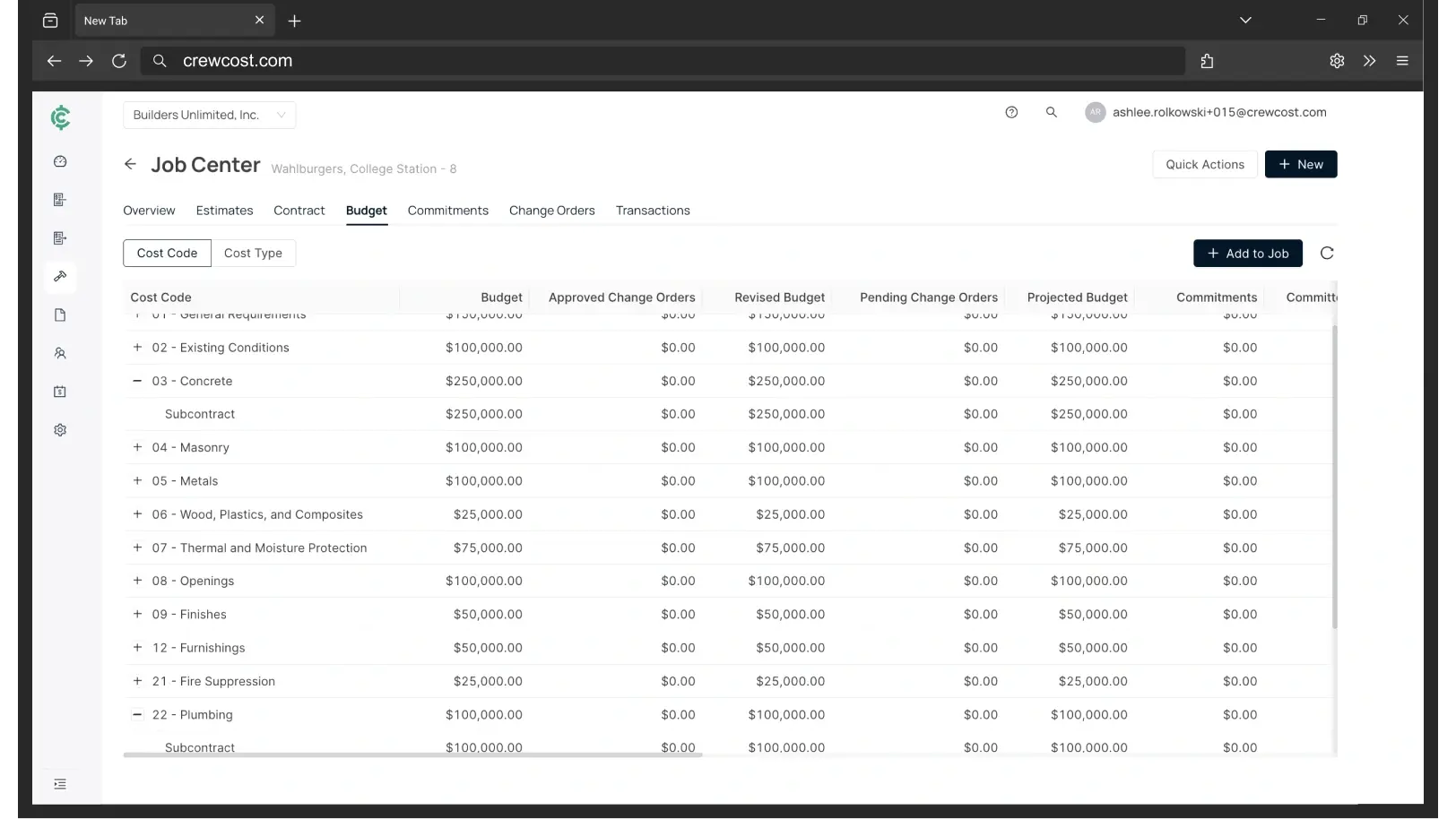
| Job cost structure | A project tag, plus items and classes; one layer | Three levels of cost codes, plus cost type: labor, material, equipment, subcontract, other; tied to the GL |
| Contracts | Estimates and purchase orders | Prime contracts and subcontracts that build the schedule of values, the pay app, and the WIP |
| When a cost reaches the job | Only if the transaction carries the project | Every bill, sub pay app, and payroll run posts by default |
| Committed costs | Not tracked | On the budget the day the sub or PO is issued |
| Cost to complete | Not available | On every budget line, with gain or fade and ECAC |
| WIP / over-under billing | A spreadsheet and a journal entry | Automatic. Job costs are a subledger of the GL, so WIP ties out |
| Retainage | Negative line items and custom reports | Tracked natively on both sides, through release |
| Labor on the job | Only the hours that were tagged; no regular and overtime split | Pay, taxes, and benefits post to the job by cost code |
| Accounts payable | Keyed or emailed in, approvals by workflow add-on | Captured from inbox, matched, routed to PMs |
| Procore | Third-party connector | Native two-way sync, payments included |
| Implementation & users | Your accountant; 5 users on Plus, 25 on Advanced | Included; unlimited users |
A project tag is not a job cost ledger.
Online tracks a job by asking you to tag every transaction with a project. Tag them all and you get a project P&L. Miss one and the cost goes to Not Specified, and nothing tells you. There are no cost codes underneath, no cost types, no prime contract or subcontract, and no budget with more than one layer. Try building Concrete, then Rebar and Forming under it, then labor, material, equipment and subcontract under each, and getting a crew's hours to land on the right line. Three places that shows up:
The cloud, with a job underneath it
Online costs less than anything here. That isn't the question.
Online is cheap and it will stay cheap. The cost that decides this sits on the other side of the move, and for most contractors leaving Online it is a three-vendor stack before anyone has opened a budget. Every figure below is for the same company: an $8M contractor with 18 employees and four people in the office.
“We’re now able to track our labor production against our estimated costs automatically.”
Your three options past QuickBooks Online
Questions Online contractors ask
Can QuickBooks Online do construction job costing?
Partly. Projects, available on Plus and above, let you tag income and costs to a job and see a project P&L. What Online does not have is the structure underneath: cost codes, a budget by cost code, committed costs when a PO is issued, cost to complete, or a WIP schedule. For a handful of small jobs that can be enough. Past that, the job costing moves to a spreadsheet.
Why does our labor show up under Not Specified?
Because Online only puts labor on a project when the time entry carries the project and payroll allocates it. Anything missed goes to Not Specified, and nothing flags it. In CrewCost hours are entered by cost code inside the system that runs payroll, so the labor and its burden post to the budget line without a second step.
Does QuickBooks Online produce a WIP report?
No. Progress invoicing bills a percentage of an estimate, but there is no schedule of values and no over- and under-billing calculation. Contractors on Online build WIP in a spreadsheet each month and post the adjustment by journal entry. CrewCost calculates WIP cost-to-cost from the same ledger the job costs post to, so it ties out.
How does Online handle retainage?
There is no retainage field. The usual workaround is a negative line item on the invoice against a retainage account, mirrored for subcontractors, and a report to track what is still held. CrewCost tracks retainage receivable and payable on the balance sheet and bills it through release.
Should we go back to Desktop, or up to Intuit Enterprise Suite?
Desktop Enterprise job-costs better than Online through its item list, but it is priced per seat and lives on a server; our Desktop comparison covers it. Enterprise Suite is Online with projects, dimensions and multi-entity on top, sold by quote; our IES comparison covers that. Neither gives you a job cost ledger.
What comes over from Online when we switch?
Your chart of accounts, items, customers, vendors and trial balance, plus open AR and AP. For jobs in flight we bring over the budget by cost code and job-to-date costs, so you finish the job in CrewCost rather than in two systems. Implementation is included and we do the mapping with you rather than handing you a template.
Build confidently.
Bring one of your jobs. We'll show you the budget, the WIP schedule, and retainage tracked through release.