

CrewCost vs. Sage 100 Contractor
Sage 100 Contractor is a Windows desktop you license by the seat and host yourself. Contractors who come to us from it name the same four problems: no mobile access, reports that need Crystal, a Procore connector that breaks, and payroll that ends in a NACHA file you upload by hand. CrewCost is the same job costing in the cloud, for your whole team, at one price.
| Sage 100 Contractor | CrewCost | |
|---|---|---|
| Job costing | By cost code, keyed in the office | By cost code, from the field to the ledger |
| Users | Per seat, per month | Unlimited |
| Where it runs | Windows, hosted per user | Cloud, nothing to host |
| Field AP & time | TimberScan and a time app | Built in, from the phone |
| Procore | Connector | Native two-way sync |
Side by side: what each one does without a workaround
Read the left column as the workflow you have today: keyed in the office, re-keyed from the field, exported to Excel. The right is the same task in CrewCost.
| Sage 100 Contractor | CrewCost | |
|---|---|---|
| Job cost structure | Cost codes and cost types; real construction accounting | Cost codes and cost types, a subledger of the GL |
| When a cost reaches the job | When the office enters it in the right module | Every bill, sub pay app, and payroll run posts by default |
| Committed costs | Tracked through subcontracts and purchase orders | On the budget the day the sub or PO is issued |
| Cost to complete | In reports, maintained by hand | On every budget line, with gain or fade and ECAC |
| WIP / over-under billing | A stock report, often reworked in Excel for the bonding company | Automatic. Job costs are a subledger of the GL, so WIP ties out |
| Retainage | Tracked | Tracked natively on both sides, through release |
| Field time to the budget | A separate time app or paper, re-keyed in the office | Built in; hours by cost code move the budget and the WIP |
| Reporting | Crystal Reports; customization is a paid service | Built in, by job, cost code, and period |
| Accounts payable | Keyed in the office; approvals through TimberScan or email | Captured from inbox, matched, routed to PMs on their phone |
| Payroll payments | Direct deposit file uploaded to the bank by hand | Direct deposit inside CrewCost Payroll |
| Bank reconciliation | Statement in hand, matched by hand | Bank feed, reconciled in CrewCost |
| Procore | Third-party connector | Native two-way sync, payments included |
| Implementation & users | Partner implementation; priced per seat, hosted per seat | Included; unlimited users |
The office has the numbers. The field never sees them.
Sage 100 Contractor keeps the ledger in the office and everything else outside it. Contractors who call us from Sage 100 Contractor say the same things: there is no mobile access, so AP approvals run through TimberScan and crew time through a separate app; every report is a Crystal Reports project; Procore never quite connects; payments need a third-party tool; bank statements get reconciled by hand; and payroll ends in a NACHA file someone uploads to the bank. Three of those, up close:
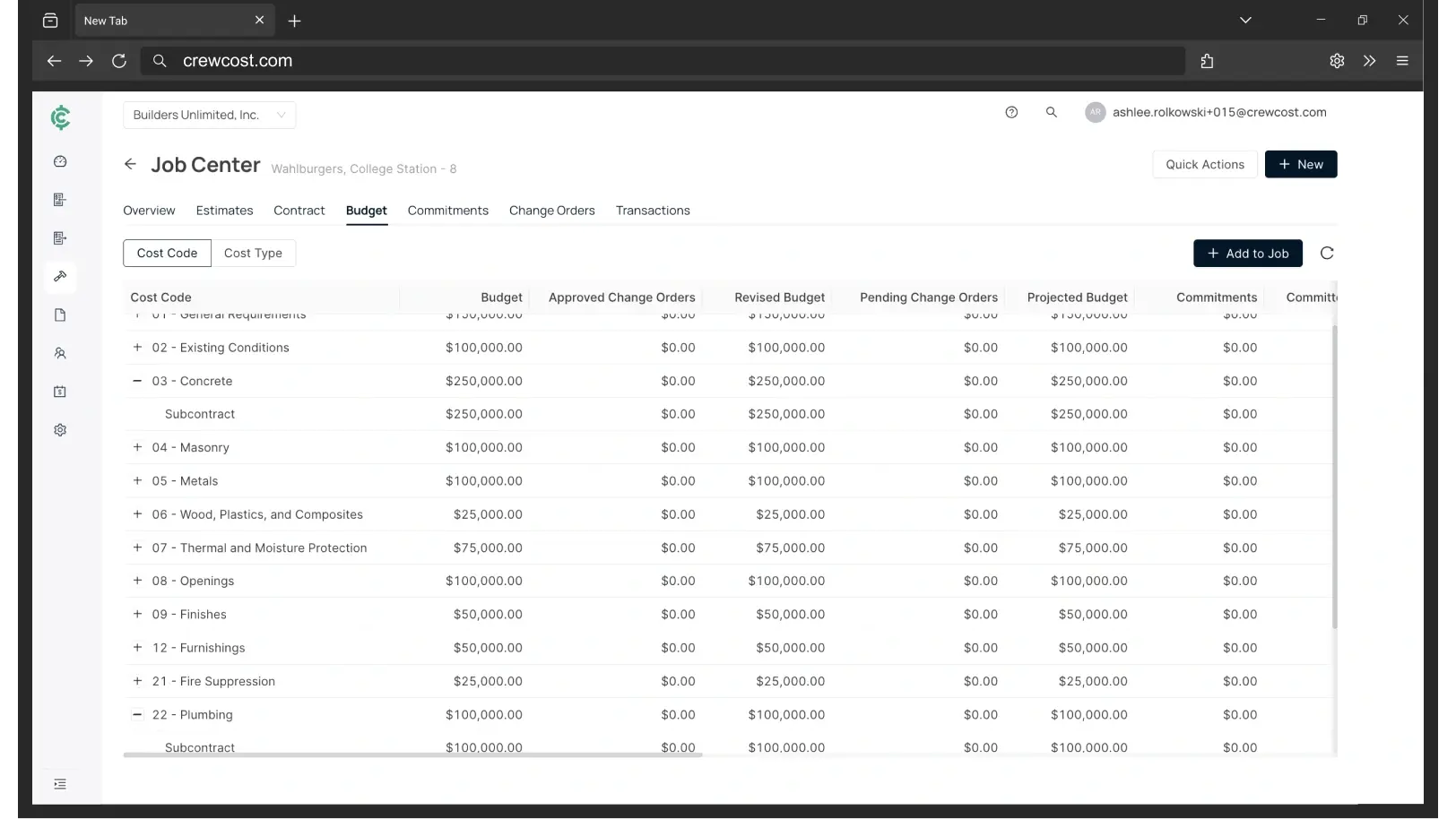
The same job costing, in the hands of the people running the job
Sage 100 Contractor isn't expensive for four people. It's expensive for twenty.
Priced per user and hosted per user, Sage 100 Contractor is affordable as long as only the office logs in. The moment PMs, superintendents and the field need the job, every one of them is a seat and a hosted desktop, and the Intacct number shows where that road leads. Every figure below is for the same company: an $8M contractor with 18 employees and four people in the office.
“We’re now able to track our labor production against our estimated costs automatically.”
Your three options off Sage 100 Contractor
Questions Sage 100 Contractor users ask
Is Sage 100 Contractor the same thing as Sage 100?
No, and the shared name causes real confusion. Sage 100 Contractor is the construction product, formerly Sage Master Builder, built around job costing, certified payroll and pay apps. Sage 100 (formerly MAS 90 and MAS 200) is a general ERP for distribution and manufacturing that some contractors also run. This page is about Sage 100 Contractor.
Is Sage 100 Contractor being discontinued?
Not that Sage has announced. It is still sold and still updated. But Sage’s cloud investment for construction is Sage Intacct Construction, and that is where Sage and its partners steer growing 100 Contractor customers. Intacct is a different product at a different price, built for much larger companies, which is why so many 100 Contractor shops are looking at what else is out there.
What does Sage 100 Contractor cost?
Sage doesn’t publish it. Independent estimates put the software at $115 to $200 per user per month, plus $50 to $150 per user per month to host it, plus partner fees for implementation, upgrades and support. The structure matters more than the number: every person who needs to see a job is a seat and a hosted desktop, so the field almost never gets one.
We run certified payroll and prevailing wage in Sage. Does CrewCost?
CrewCost Payroll runs inside the accounting system: processing, direct deposit and tax filing in all 50 states, with hours entered by cost code so labor and burden post to the job budget without a second step. If you run prevailing-wage or certified payroll today, raise it on the demo first; we will tell you exactly where we are rather than let you find out later.
Does CrewCost replace TimberScan and our time-tracking app?
Both jobs, yes. Invoices are captured from your AP inbox, matched to the job and cost code, and routed to the PM to approve from a phone. Crew time is entered by cost code in CrewCost and posts to the budget and to payroll without a second system. Unlimited users means every PM, superintendent and foreman gets a login rather than a workaround.
What about estimating and service management?
CrewCost is the accounting and job-cost system, not an estimating or service-dispatch tool. Job budgets import from your estimate by cost code, and many customers pair CrewCost with a dedicated estimating tool and Procore or a field app. If service work is a large part of your business, say so on the demo.
What comes over from Sage 100 Contractor when we switch?
Your chart of accounts, jobs and cost codes, customers, vendors and trial balance, plus open AR and AP. For jobs in flight we bring over the budget by cost code, job-to-date costs, and retainage balances, so you finish the job in CrewCost rather than in two systems. History stays in your Sage archive for reference. Implementation is included and we do the mapping with you.
We use Procore with Sage 100 Contractor. What happens to that?
The connector goes away. CrewCost has a native Procore integration: jobs, budgets, prime contracts, commitments, subcontractor invoices and direct costs sync between the two systems, vendors and customers stay in sync, and payments flow both ways.
Build confidently.
Bring one of your jobs. We'll show you the budget, the WIP schedule, and retainage tracked through release.