Every subcontractor says a version of it on the first call: Labor is all over the place, and I can’t tell where we’re winning and where we’re losing. CrewCost is construction accounting built around the job, for electrical, mechanical, plumbing, concrete and specialty contractors who run crews, bill progressively and carry retainage.
A time tracking app for the crews. QuickBooks for the books. A spreadsheet for the pay app, another for the WIP, and a foreman's memory for what actually happened on the job. By the time anyone knows a job lost money, it is closed out and the next one has been bid the same way.
“Labor is all over the place.”
In CrewCost the crew enters hours by cost code from the phone, and payroll posts actual labor with real burden to that budget line, regular and overtime split. You see hours against budgeted hours and dollars against budgeted dollars by cost code, weekly, not at closeout.
“We're underbilled and financing the GC's job.”
Most subcontractors on QuickBooks underbill every month and never see it. CrewCost's WIP schedule shows over and under billings by job from the same ledger the costs post to, so you bill what you have earned while the month is still open.
“The pay app takes three days every month.”
Set up the prime contract and its schedule of values once. Enter percent complete and stored materials, and CrewCost builds the AIA-style pay application with retainage calculated on every line. Change orders roll into the contract value automatically.
“Retainage is a number in somebody's head.”
Retainage the GC holds from you is calculated on each pay app and tracked as retainage receivable on the balance sheet, through release. Retainage you hold from second-tier subcontractors is tracked the same way as retainage payable. No side spreadsheet, no year-end surprise.
One job, start to finish
How a subcontractor runs a job in CrewCost
Pick a step. Every screen is the same system, and every number ties back to the ledger.
What’s included
One system, one price, unlimited users
Job costing as a subledger of the GL
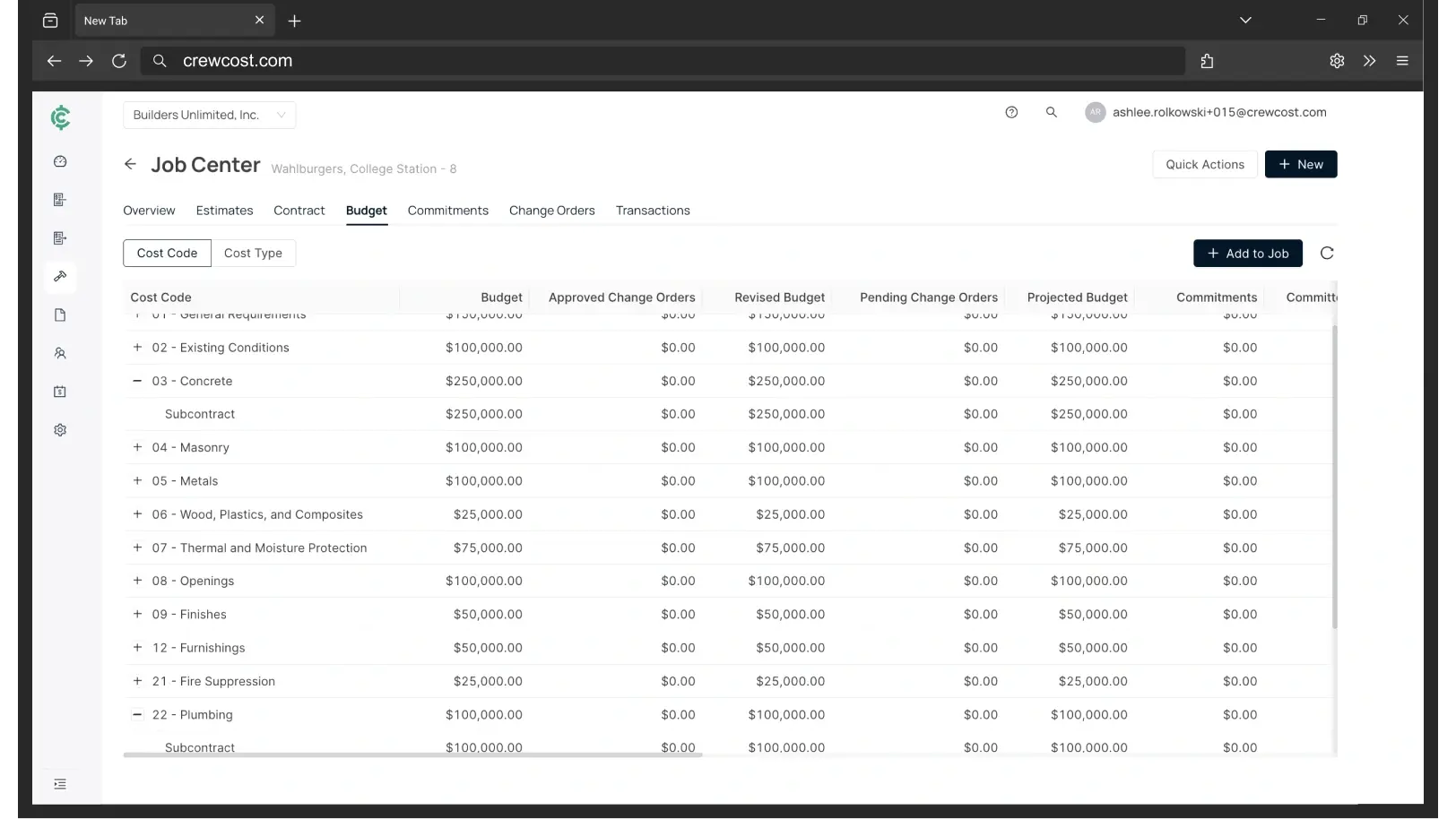
Every job cost is a general ledger transaction. Budgets, WIP and financials agree because they are the same numbers.
Labor against budget, by cost code
Hours against budgeted hours and dollars against budgeted dollars, regular and overtime split, burden included. You know whether the estimate was light or the overtime ate it.
Progress billing and retainage
Prime contracts build the schedule of values and the AIA-style pay app. Retainage receivable and payable tracked on the balance sheet through release.
Time tracking with real burden
Crews enter hours by cost code from the phone. Payroll posts pay, taxes and benefits to the job, and the budget moves the same week.
AI-powered accounts payable
Supplier bills and second-tier subcontractor invoices captured from your inbox, matched to POs and cost codes, approved by the PM from the field.
Procore, when the GC runs it
If your GCs run Procore, CrewCost syncs jobs, contracts, invoices and costs natively. If they don't, CrewCost stands on its own.
“We’re now able to track our labor production against our estimated costs automatically.”
Daniel Kurtin, General Manager, Luma Exteriors — exterior contractor, $5–10M revenue
Coming from
Outgrown QuickBooks? Quoted Sage? Start here.
What each one costs, where it runs out for a subcontractor, and what comes over when you switch.
How do I know if a job is on budget before it is finished?
Every cost posts as it happens: labor from time tracking, supplier bills from AI-powered AP, subcontracts and POs as committed costs. The job budget shows estimate against actual by cost code in real time, so you see a line drifting in week three rather than at closeout.
What does the labor report actually show?
Hours against budgeted hours and dollars against budgeted dollars by cost code, with regular and overtime split and burden included. That split is how you tell whether the estimate was light or whether overtime ate a budget that was fine on paper.
What is WIP reporting and why does it matter for a subcontractor?
A work-in-progress schedule compares what you have billed on each job to what you have earned based on cost to date. Underbilled means you are financing the GC’s project with your own cash. Most subcontractors on QuickBooks have no WIP report at all; CrewCost generates it from the same ledger the costs post to, and your bonding agent and bank get it the day you close.
How is retainage handled?
Retainage the GC or owner withholds is calculated on each pay application and tracked as retainage receivable on the balance sheet, no QuickBooks workaround and no spreadsheet. Retainage you withhold from second-tier subcontractors posts as retainage payable the same way, and both are billed and released from the contract when the job closes.
How does progress billing work?
Set up the prime contract and its schedule of values once. Each month, enter percent complete and stored materials if you have them, and CrewCost builds the AIA-style pay application with retainage calculated automatically. Change orders roll into the contract value, so the pay app and the WIP stay in step.
Does CrewCost work for electrical, HVAC, mechanical, plumbing and concrete contractors?
Yes. Any subcontractor that holds prime contracts, bills progressively, carries retainage and runs crews fits: electrical, HVAC and mechanical, plumbing, concrete, glazing, roofing and other specialty trades.
Do we need Procore, and can we switch from QuickBooks mid-year?
Procore is not required; CrewCost is a complete construction accounting system on its own. When a GC runs Procore, the native integration keeps jobs, contracts, invoices and costs in sync. The cleanest switch is at the start of a year, mid-year migrations are supported, and implementation is included, with most subcontractors live in days.
Build confidently.
Bring one of your jobs. We'll show you labor against budget by cost code, the pay app, and where the margin went, in your numbers.