

CrewCost vs. Sage 300 CRE for Contractors
Sage 300 CRE is a Windows server product Sage sells by subscription and steers its own customers away from. Half the bill is hosting, the reports are Crystal, and the upgrade path is Intacct at four times the price. CrewCost is cloud construction accounting with the field inside it, at a third of the bill.
| Sage 300 CRE | CrewCost | |
|---|---|---|
| Job costing | By cost code, keyed in the office | By cost code, from the field to the ledger |
| WIP report | Crystal report, rebuilt in Excel | Automatic |
| Where it runs | Your server or a host | Cloud, nothing to host |
| Custom reports | Crystal Reports, paid | Built in |
| How it’s priced | Modules + licences + hosting | Flat, unlimited users |
Side by side: what each one does without a workaround
The left column is the workflow you have: a hosted desktop, Crystal reports, TimberScan, a NACHA file. The right is the same task in CrewCost.
| Sage 300 CRE | CrewCost | |
|---|---|---|
| Job cost structure | Cost codes and categories; real construction accounting | Cost codes and cost types, a subledger of the GL |
| When a cost reaches the job | When it is entered in the right module by the right person | Every bill, sub pay app, and payroll run posts by default |
| Committed costs | Tracked through commitments in Project Management | On the budget the day the sub or PO is issued |
| Cost to complete | In job cost reports, maintained by hand | On every budget line, with gain or fade and ECAC |
| WIP / over-under billing | A Crystal report, usually rebuilt in Excel for the bonding company | Automatic. Job costs are a subledger of the GL, so WIP ties out |
| Retainage | Tracked | Tracked natively on both sides, through release |
| Where it runs | A Windows server: yours, or a third-party host with RDP and MFA; no mobile | Cloud; nothing to host, patch, or archive; any device |
| Reporting | Crystal Reports; customization is a paid service | Built in, by job, cost code, and period |
| Accounts payable | Keyed in the office; approvals through TimberScan or email | Captured from inbox, matched, routed to PMs on their phone |
| Payroll payments | NACHA file uploaded to the bank by hand | Direct deposit inside CrewCost Payroll |
| Bank reconciliation | Statement in hand, matched by hand | Bank feed, reconciled in CrewCost |
| Procore | Connector, plus PJ or JC licences for anyone who needs the job | Native two-way sync, payments included |
| Implementation & users | Partner implementation; licences by module and seat | Included; unlimited users |
A server you pay to keep alive, and a vendor that has moved on.
Sage 300 customers pay for a server, a host, a partner and a stack of add-ons to run a product Sage is no longer building its future on. They call us because it runs on a Windows server somebody has to host, patch, back up and archive; because there is no mobile access, so AP approvals run through TimberScan and crew time through a separate app; because every report that isn't stock is a Crystal Reports project; because payments need a third-party tool and payroll ends in a NACHA file uploaded to the bank by hand; and because Sage's own answer to all of that is a different product at several times the price. Three places that shows up:
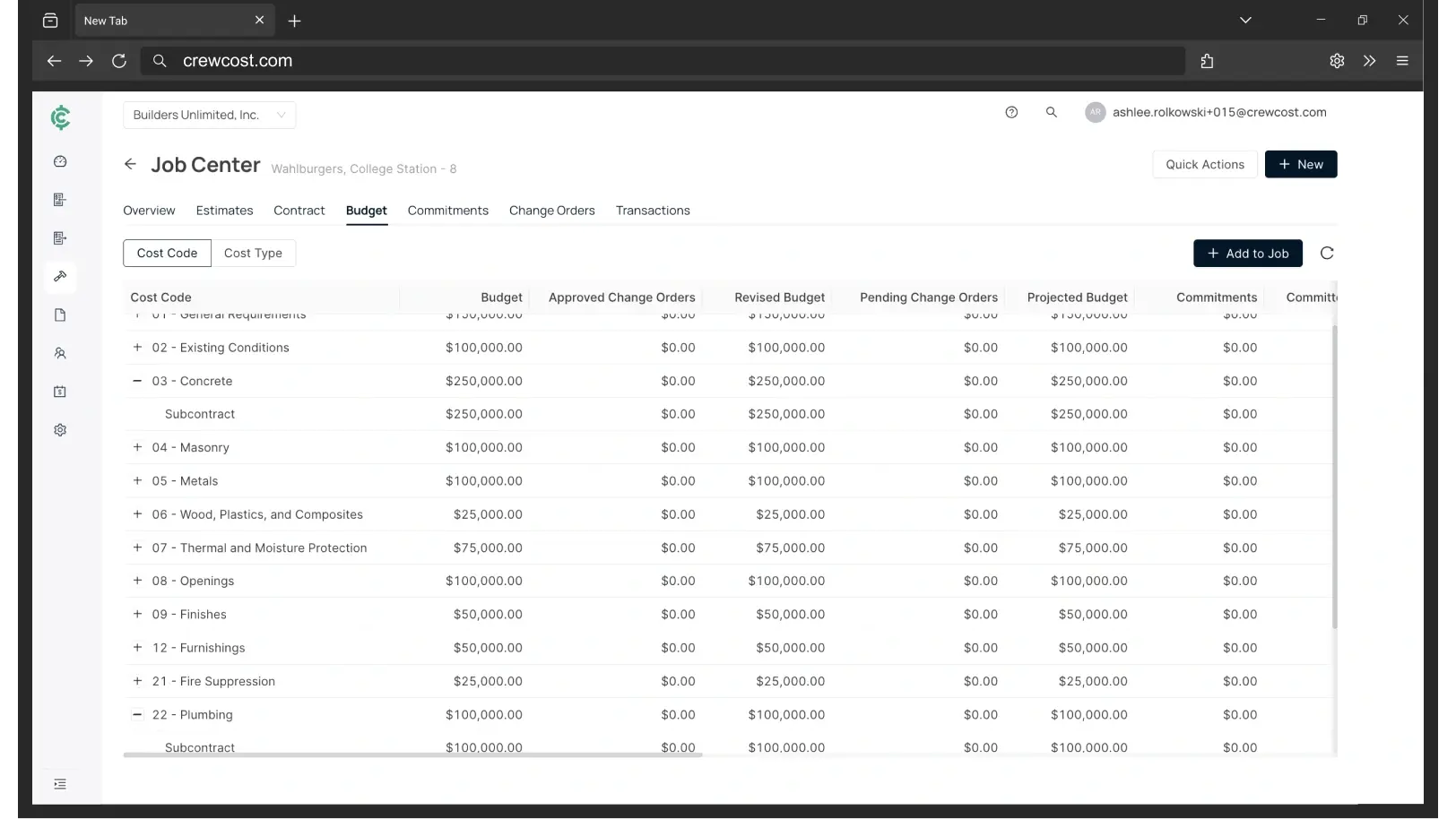
Sage 300's job costing, without the server
Sage is a third of the bill. The server is half.
The Sage 300 figure below is a real annual cost from a $35M contractor on the low end of users, shared with permission. The other two are priced for an $8M contractor with 18 employees and four people in the office, and both would cost that $35M company more, not less. The shape of the Sage 300 bill is the point: the software is the smallest line on it.
“We’re now able to track our labor production against our estimated costs automatically.”
Your three options off Sage 300
Questions Sage 300 contractors ask
Is Sage 300 CRE being discontinued?
Sage hasn’t published an end date that we have seen, and existing customers keep renewing. What has changed is the model: Sage now sells 300 as a monthly subscription priced by module and licence count rather than a one-time licence with maintenance, and Sage’s own guidance to 300 customers is to migrate to Sage Intacct Construction. In practice, the product you bought is now a subscription, and the upgrade path is a different product at a different price.
Does CrewCost do what Sage 300 does?
On the accounting, yes: cost codes, committed costs, cost to complete, WIP, retainage on both sides, and AIA-style progress billing from a schedule of values, with payroll and field time posting to the budget. Where Sage 300 goes further today is in peripheral modules such as equipment and inventory. If you lean on those, say so on the demo and we will tell you straight where we are.
What about payroll?
Many Sage 300 contractors already pay their crews outside Sage from a NACHA file. CrewCost Payroll runs inside the system: processing, direct deposit, and tax filing in all 50 states, with hours entered by cost code so labor and its burden post to the job budget without a second step.
What comes over from Sage 300 when we switch?
Your chart of accounts, jobs and cost codes, customers, vendors and trial balance, plus open AR and AP. For jobs in flight we bring over the budget by cost code, job-to-date costs, and retainage balances, so you finish the job in CrewCost rather than in two systems. History stays in your Sage archive for reference. Implementation is included and we do the mapping with you.
We use Procore with Sage 300. What happens to that?
The connector and the extra Sage licences go away. CrewCost has a native Procore integration: jobs, budgets, prime contracts, commitments, subcontractor invoices and direct costs sync between the two systems, vendors and customers stay in sync, and payments flow both ways.
Should we just move to Sage Intacct?
If you are heading past $50M with several entities to consolidate, Intacct is a serious option and Sage will make the introduction. If you are a $5–30M contractor on 300 because the job costing works, Intacct is per-seat pricing, an ongoing partner subscription, and a third payroll vendor for the accounting you already have. Our Intuit Enterprise Suite comparison covers the other common upgrade path.
Build confidently.
Bring one of your jobs. We'll show you the budget, the WIP schedule, and retainage tracked through release.