

CrewCost vs. Intuit Enterprise Suite for Contractors
Intuit Enterprise Suite is QuickBooks Online with a project layer, multi-entity consolidation, and a sales rep instead of a price list. CrewCost is construction accounting built on a job-cost ledger, at a price you can read on the pricing page.
| Intuit Enterprise Suite | CrewCost | |
|---|---|---|
| Job costing | Projects and dimensions on QuickBooks Online | A subledger of the GL |
| WIP report | Report by project | Cost-to-cost schedule that ties out |
| Retainage | No native field | Native tracking + release |
| Procore | No native integration | Two-way sync |
| How it’s priced | Custom quote, per seat past ten | Published, unlimited users |
Side by side: what each one does without a workaround
IES is a real step up from QuickBooks Online. The question is whether the step lands on a construction ledger or on a better-organized version of the one you have.
| Intuit Enterprise Suite | CrewCost | |
|---|---|---|
| Job cost structure | Projects plus up to 20 reporting dimensions on the QuickBooks Online ledger | Cost codes and cost types as real structure, a subledger of the GL |
| When a cost reaches the job | When someone tags it to the project and dimension | Every bill, sub pay app, and payroll run posts by default |
| Contracts | Estimates and purchase orders on projects | Prime contracts and subcontracts that build the schedule of values, the pay app, and the WIP |
| Committed costs | A report built from tagged POs | On the budget the day the sub or PO is issued |
| Cost to complete | Project-level tracking | On every budget line, with gain or fade and ECAC |
| WIP / over-under billing | Work in Progress by Project report | Cost-to-cost WIP schedule that ties to the GL |
| Retainage | No native field; custom accounts and manual release | Tracked natively on both sides, through release |
| Field time to the budget | QuickBooks Time, requires Payroll Elite; hours reach the project | Built-in time by cost code; hours move the budget and the WIP |
| Accounts payable | Online bill entry with approval workflows | Captured from inbox, matched, routed to PMs |
| Procore | No native integration | Native two-way sync, payments included |
| Pricing & users | Custom quote; ten seats included, per user beyond | Published; unlimited users, implementation included |
It's QuickBooks Online underneath. The ceiling comes with it.
IES adds projects, up to twenty reporting dimensions, multi-entity consolidation and a set of construction reports on top of the QuickBooks Online ledger. Those are real additions, and if you run several companies they may be the reason to buy. But the job-cost model is still Online's: a cost reaches a project when someone tags it, and the budget, WIP and retainage live in reports that read the tags rather than a ledger that enforces them. Three places that shows up:
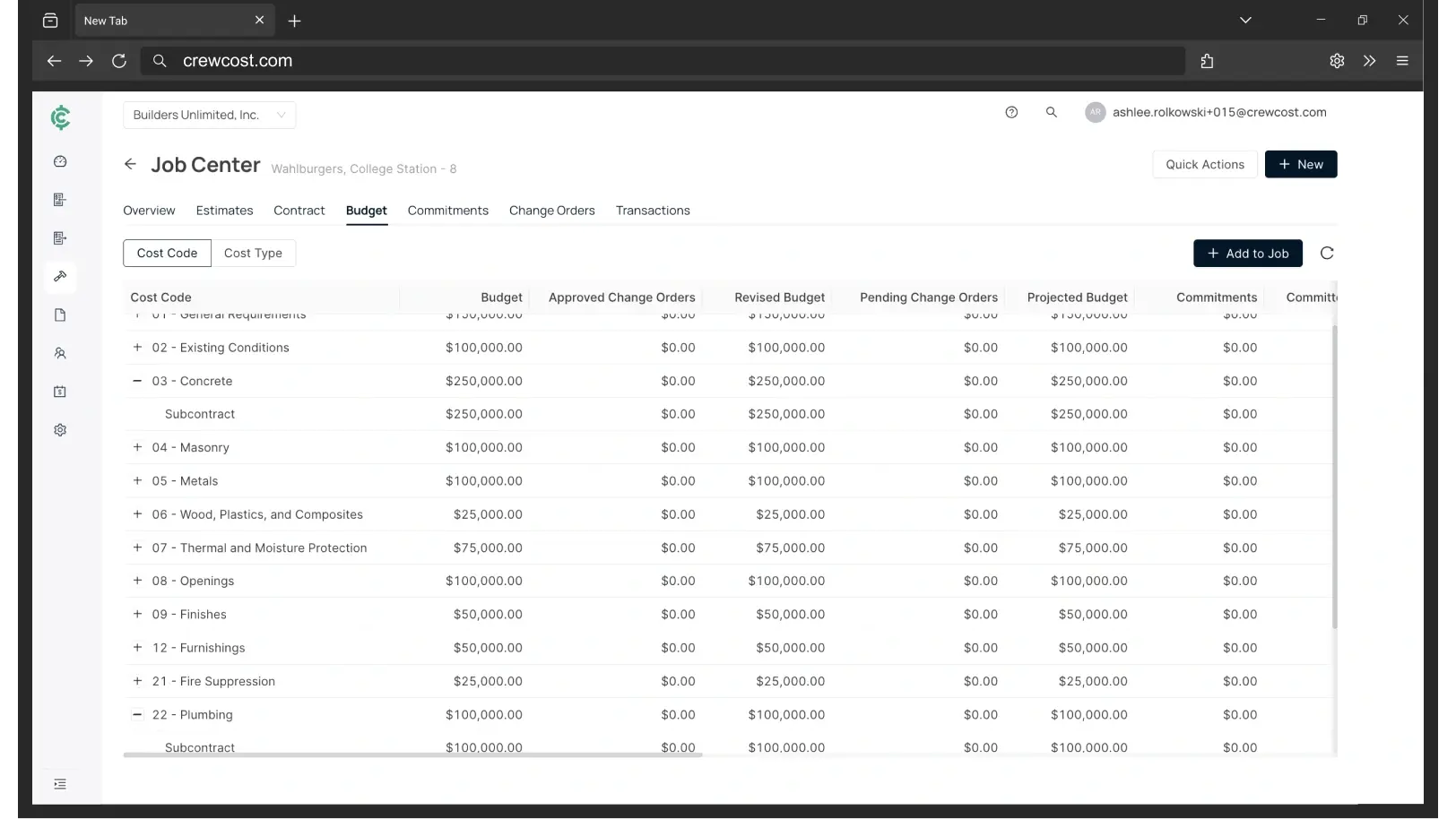
Construction accounting that doesn't start from QuickBooks Online
The question isn't what IES costs. It's what the step up buys.
Intuit doesn't publish a price for Enterprise Suite. You get one from a rep, partners can discount it heavily, and two contractors rarely pay the same. Independent estimates put a single-entity subscription near $8,000 a year before payroll, implementation, and any seats beyond the ten included. Every figure below is for the same company: an $8M contractor with 18 employees and four people in the office.
“We’re now able to track our labor production against our estimated costs automatically.”
Your three options past QuickBooks
Questions contractors ask about Intuit Enterprise Suite
What does Intuit Enterprise Suite cost?
Intuit doesn’t publish a price. Quotes depend on entities, seats and the modules you turn on, and ProAdvisor partners can discount heavily, so the number varies by who sells it to you. Independent estimates put a single-entity subscription near $8,000 a year before payroll and implementation. Ask for the year-two price and the per-seat rate past the ten included users before you compare it to anything.
Is Intuit Enterprise Suite the new QuickBooks Enterprise?
No. QuickBooks Desktop Enterprise is still sold and still runs on your server. Enterprise Suite is a separate cloud product built on QuickBooks Online, aimed at companies upgrading from Online and at groups that need several entities consolidated. If you are on Desktop Enterprise for its job costing, IES is a different product, not a newer version.
Does IES do construction job costing?
Yes, through projects and dimensions, with project profitability, change orders, cost-to-complete tracking and a WIP-by-project report. The difference from CrewCost is structural: in IES a cost is on the job because someone tagged it; in CrewCost job costs are a subledger of the general ledger, so the budget, WIP and job-cost reports tie out to the financials by construction.
Does IES handle retainage and AIA billing?
Intuit describes AIA-style invoicing, which groups an invoice by phase. There is no schedule of values with a G702 and G703 behind it, and no retainage field; partners track retainage with custom accounts and release it by hand. CrewCost tracks retainage receivable and payable on the balance sheet and bills from the schedule of values.
We’re on QuickBooks Desktop Enterprise. Should we move to IES or CrewCost?
If the problem is several companies and consolidated statements, IES solves that well. If the problem is job costing, WIP, retainage or getting crew hours onto a budget, IES gives you Online’s version of the job costing you already have on Desktop, and CrewCost gives you the version Desktop never had. Our Desktop comparison covers that move in detail.
What comes over when we switch to CrewCost?
Your chart of accounts, items, customers, vendors and trial balance, plus open AR and AP. For jobs in flight we bring over the budget by cost code and job-to-date costs, so you finish the job in CrewCost rather than in two systems. Implementation is included and we do the mapping with you rather than handing you a template.
Build confidently.
Bring one of your jobs. We'll show you the budget, the WIP schedule, and retainage tracked through release.