Skip to content

PURPOSE-BUILT FOR CONTRACTORS

Construction Job Costing Software Built to Protect Profitability

Stop watching margins shrink as a job goes on. CrewCost builds job budgets from your estimate, tracks actual costs against them in real time — materials, subs, and labor from time tracking and payroll — and shows general and specialty contractors exactly where every job stands.

Don't Just Report on Costs — Control Them

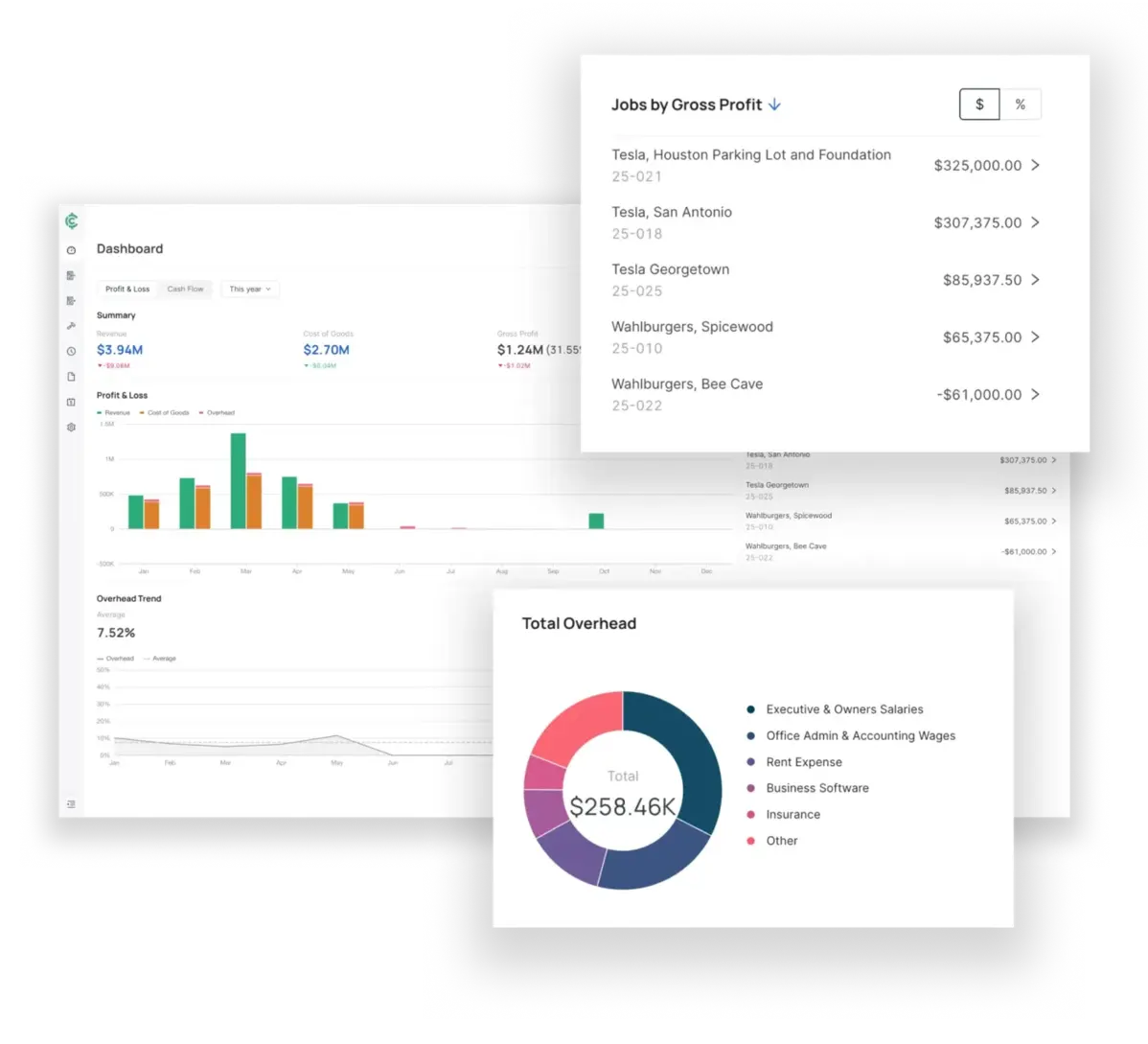
If you’re manually tracking project costs, you can’t catch budget overruns until it’s too late to correct course. CrewCost helps you understand how every project cost impacts your overall budget in real-time, so you can gain full control over your profitability and address any issues before it’s too late.

Get Insights That Drive Profits

Tired of third party integrations that don’t quite work together? In CrewCost, all the data you need to job cost is already there in our accounting tool built specifically for construction.

  • Track estimated costs against actual costs in real-time
  • Create and manage change orders to ensure you aren’t working for free
  • Manage committed costs like subcontracts and purchase orders
  • Percent complete billing
  • Track and approve subcontractor invoices
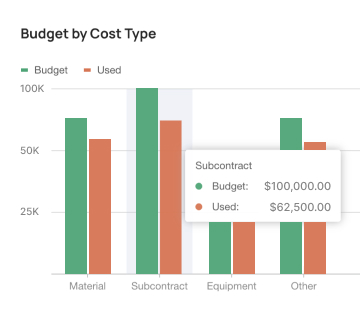
Crewcost job budget card

Job Costing and Construction Accounting — Together

Stop losing data because of incomplete integrations. With accounting and job costing in one place, you’ll eliminate all the runarounds so you can accurately job cost and increase your profits
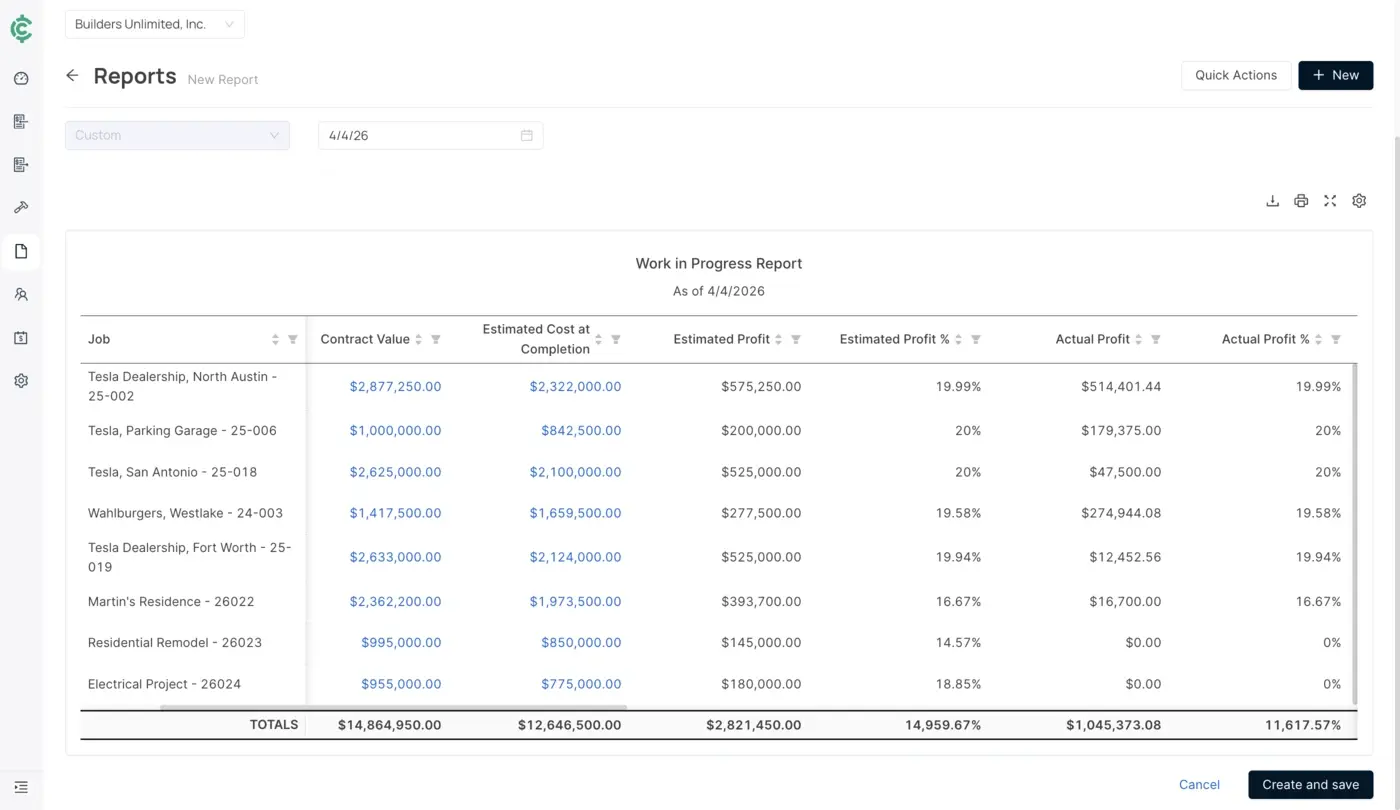
WIP Reporting

See WIP reporting at the job and company level.

https://21986953.fs1.hubspotusercontent-na1.net/hubfs/21986953/crewcost%20wip%201400x810.webp
Change Order Management

Create change orders that update the budget and forecast to complete the job.

https://21986953.fs1.hubspotusercontent-na1.net/hubfs/21986953/crewcost%20change%20orders.webp
Get As Granular As You Want

Drill down into every cost code and cost type to see exactly what ate your budget.

https://21986953.fs1.hubspotusercontent-na1.net/hubfs/21986953/crewcost%20job%20center%20cost%20type%20drilldown%201400x890.webp
crewcost wip 1400x810
Eliminate Double Entry of Data — It's a Win-Win.
Ditch your disjointed manual processes and switch to job costing software that ties directly into your accounting system and time tracking — all on the cloud.
Construction Accounting
When your expenses and budgets live in the same place, it’s easier to control costs and grow profits.
Learn More
Time Tracking
Get a real-time view of your labor costs for each job so you can run more profitable jobs.
Learn More

Easy for your team to implement.

Job costing is tough to do in generic software. And of course the construction-specific softwares that do it come with weeks of custom implementation and a hefty price tag.

CrewCost is designed to work for your construction company out of the box. No implementation fees and no wrestling with poorly-fit tools for weeks on end. It just works.

01
Everything You Need

CrewCost was built to meet the needs of growing general contractors and specialty contractors, without cobbling together spreadsheets and manual processes. 

02
Easy to Adopt

Affordable for emerging contractors, without weeks of implementation or hefty fees.

03
Simple to Access

Skip the VPNs and access CrewCost's 100% cloud-based software from anywhere.

Put CrewCost to work

And make sure your hard work doesn’t go to waste. See how our cloud-based construction accounting, job costing, and time-tracking tools can improve your cash flow and bottom line. 

crewcost dashboard array bofy

FAQs

How does CrewCost’s accounting functionality support job costing?

CrewCost’s job costing is built on its construction accounting system, so every bill, subcontract, purchase order, and payroll run posts to the job the moment it’s approved. There’s no integration to maintain and no double entry between a project management tool and the books. With time tracking and payroll integrated, labor costs land on job budgets automatically, so you see real-time profitability by job, cost code, and cost type.

What is construction job costing software?

Construction job costing software tracks the estimated and actual cost of every job by cost code and cost type — labor, materials, subcontracts, equipment, and other — so contractors can see margin as work progresses instead of after it’s finished. The best job costing software is part of the accounting system, because that’s where the costs actually live.

How does construction accounting software differ from regular accounting software and ERPs?

Generic accounting systems like QuickBooks Online™ and Xero™ are good products, but they aren’t designed for construction and need integrations or spreadsheets to handle retainage, percent-complete billing, and job costing. Construction ERPs like Sage and Viewpoint solve those problems with months of implementation and high cost. CrewCost is built to solve them out of the box.

Why should construction businesses consider switching to cloud-based accounting solutions?

When you have to use a VPN to log in from the job site, it’s much harder for project managers to keep an accurate, constant pulse on budgets and expenses for each job. Cloud-based software makes your financials securely accessible from anywhere, with no servers to maintain.

What are the primary features to look for in construction job costing software?

Look for a job cost ledger tied directly to the general ledger, budgets by cost code and cost type, committed cost tracking for subcontracts and purchase orders, change orders that update budget and forecast, retainage billing, percent-complete (AIA-style) billing, WIP reporting at the job and company level, and labor costs that flow in from time tracking and payroll without re-entry.

Does CrewCost have a service management module?

If you’re a subcontractor with a large field service team and work-order needs, a service management module matters. CrewCost does not currently include service management; we support the construction and build side of your business.
Crewcost Blog
Go to Blog ›
Construction Accounting
8 min read
The Complete Guide to AP Automation for Construction Companies
Read More ›
Construction Accounting
4 min read
Cash vs. Accrual Accounting for Contractors: When to Make the Switch
Read More ›
Construction Accounting
5 min read
Why Construction Businesses Stall Out - And What to Do About It
Read More ›