Skip to content

Construction Accounting Software for Contractors

CrewCost is modern, cloud-based construction accounting software for general contractors and specialty contractors moving on from QuickBooks. Real-time job costing, AI-powered accounts payable, WIP reporting, retainage, and job-costed payroll — without the complexity or cost of Sage, Viewpoint, or Acumatica.

Accounting Software Built for the Construction Industry

CrewCost gives general contractors and specialty contractors real-time visibility into job costs, out-of-the-box controls for committed costs and retainage, and accounts payable workflows built for how contractors actually work.

Make More Profitable Decisions

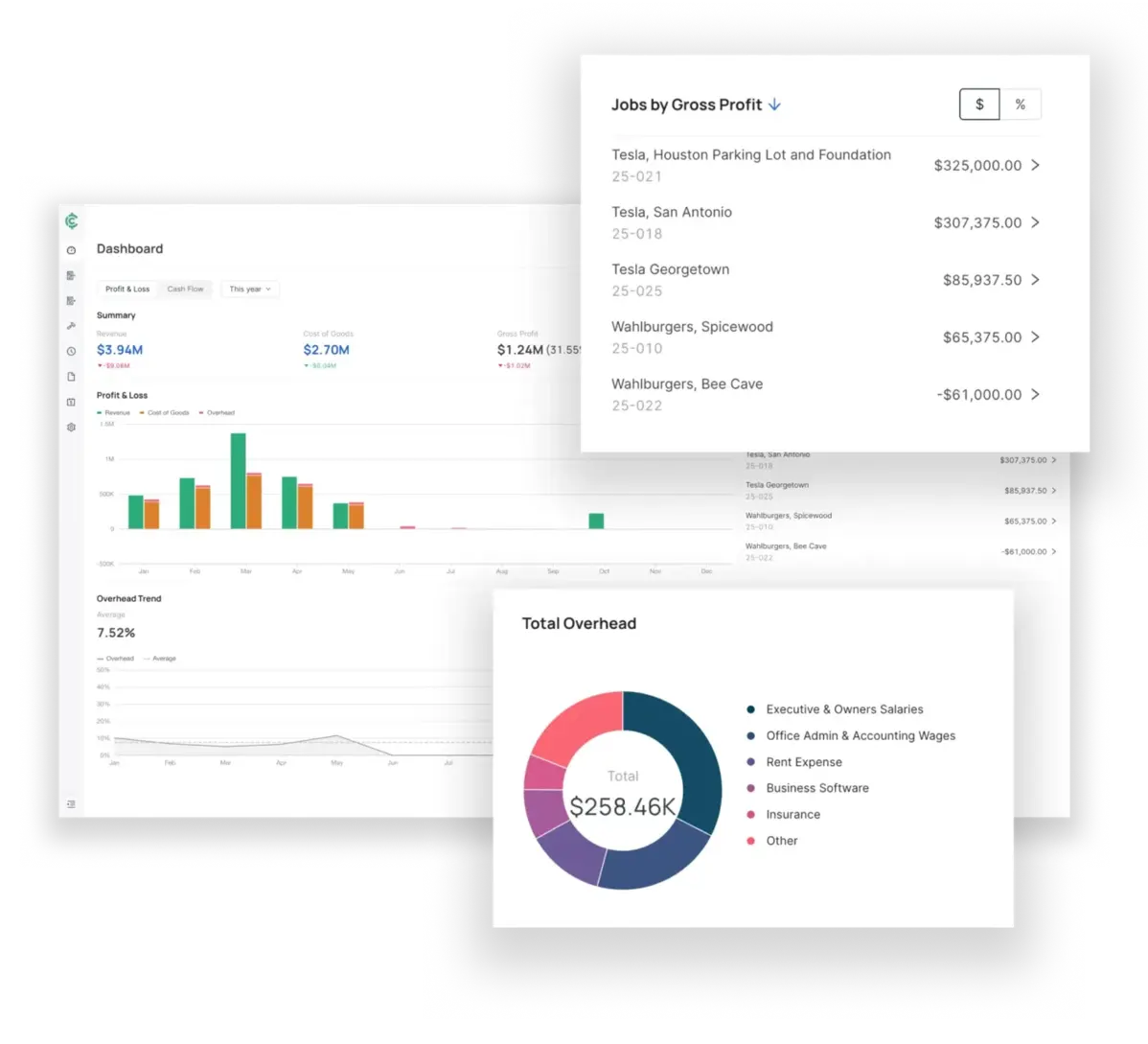
CrewCost provides purpose-built financial reporting that’s critical for construction firms to be successful and improve financial decision making.

  • Customizable financial reporting.
  • Improve job profit and cash flow forecasting.
  • Create and track progress billings.
  • Easily track and manage project costs.
  • See the impact of change orders.

Simplify Retainage Tracking

Jerry-rigged solutions make tracking retainage a pain. CrewCost streamlines progressive invoicing and accounting for retainage on accounts receivables and payables — you’ll never lose track of what you’re owed and what you owe downstream subcontractors.

  • Account for retainage on prime contracts and subcontracts.
  • Create retainage invoices against accounts receivables owed.
  • Streamline reporting on retainage payables that you owe.

Control Committed Costs

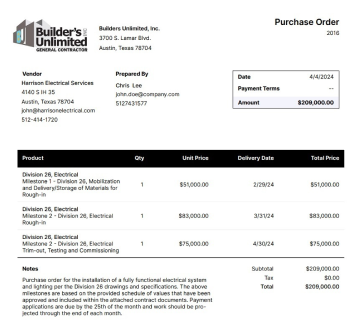
CrewCost includes cost controls for managing committed costs in real-time — both for subcontracts and purchase orders.

  • Create purchase orders and track partially received quantities.
  • Leverage subcontracts to manage subcontractor costs at the project level.
  • View commitments on your project budget, so you can forecast costs at completion.
purchase order in crewcost
Manage your projects and your business, all in one place.
CrewCost connects accounting with job costing and time tracking in one cloud-based application that gives you complete visibility into the health of your business, plus the data you need to proactively adjust bids and improve margins.
Job Costing
Get real-time visibility into the profitability of each job.
See Job Costing in CrewCost
Time Tracking
Track your labor costs using our best-in-class mobile app.
See Time Tracking in CrewCost

Construction accounting without the hassle or the fees

Generic accounting software like QuickBooks® require a bunch of clunky workarounds just to manage simple tasks like tracking retainage. And most construction-specific software comes with weeks of custom implementation and a hefty price tag.

CrewCost is designed to work for your construction company out of the box. No implementation fees and no wrestling with poorly-fit tools for weeks on end. It just works.

01
All-In-One

No cobbling together outdated solutions and spreadsheets. CrewCost was built from the ground up to meet the precise needs of growing contractors. 

02
Easy to Adopt

Affordable for emerging contractors, without weeks of implementation or hefty fees.

03
Simple to Access

Skip the VPNs and access CrewCost's 100% cloud-based software from anywhere.

Put CrewCost to work

And make sure your hard work doesn’t go to waste. See how our cloud-based construction accounting, job costing, and time-tracking tools can improve your cash flow and bottom line. 

crewcost dashboard array bofy

FAQs

What is construction accounting software?

Construction accounting software supports the accounting needs specific to contractors: job costing, progress billing, retainage, committed costs, and WIP reporting. CrewCost adds AI-powered accounts payable, job-costed payroll, and real-time job profitability in one cloud-based system.

How does construction accounting software differ from regular accounting software and ERPs?

Generic accounting systems like QuickBooks® Online and Xero™ are good products, but they aren’t designed for construction and need integrations or spreadsheets to handle retainage, percent-complete billing, and job costing. Construction ERPs like Sage and Viewpoint solve those problems but bring months of implementation and high cost. CrewCost is the middle ground: real construction accounting that works out of the box.

Does CrewCost work for specialty contractors like electrical, mechanical, and concrete?

Yes. CrewCost tracks the prime contract you hold with the owner or general contractor and lets you bill against it progressively each month in an AIA-style invoice format, with retainage withheld upstream tracked automatically. Job costing by cost code and job-costed payroll allocate labor — the largest cost most specialty contractors carry — straight to job budgets. If you carry your own tier-two subs, CrewCost tracks those subcontracts and downstream retainage too.

Why should construction businesses consider switching to cloud-based accounting solutions?

With on-premise software you need a VPN to log in from the job site, which makes it hard for project managers to keep a constant pulse on budgets and expenses. Cloud-based software makes your financials securely accessible from anywhere, with no servers to maintain.

Does CrewCost integrate with Procore?

Yes, natively. CrewCost syncs jobs, budgets, prime contracts, commitments, subcontractor invoices, and direct costs with Procore, and keeps vendors and customers in sync between the two systems. Payments flow both ways, which most integrations don’t support, and receipts attached to expenses in CrewCost are attached to the matching direct costs in Procore. Your project team works in Procore, your accounting team works in CrewCost, and nobody enters anything twice.

Does CrewCost offer customer support?

Yes. Every CrewCost customer has access to our support team, and implementation is included — there are no separate implementation fees.

How hard is it to implement CrewCost?

Most construction-specific accounting software like Jonas, Sage, CMiC, and ComputerEase is difficult and costly for small and mid-sized contractors to implement. CrewCost forgoes the hefty implementation fees and gets your accounting system set up in days, not months.

What features should contractors look for in construction accounting software?

The best construction accounting software includes standard accounting functionality — general ledger, chart of accounts, accounts payable and receivable — plus a job cost ledger, retainage billing, committed cost tracking, WIP reporting, time tracking, and payroll that posts labor to jobs. Most contractors need job costing that is actionable and as much manual work automated as possible. CrewCost brings accounting, job costing, AP automation, and payroll into one system so data flows from job budgets all the way up to company financials.

My project management software does job costing, why do I need that in my accounting software?

Project management software like Procore and Buildertrend offer job costing tools, but they depend on an integration with your accounting system to work. Those integrations often have gaps that create more manual work. When job costing lives in the accounting system, the numbers are the numbers.

Does CrewCost have a service management module?

If you’re a subcontractor with a large field service team and work-order needs, a service management module matters. CrewCost does not currently include service management; we support the construction and build side of your business.

Crewcost Blog
Go to Blog
Construction Accounting
8 min read
The Complete Guide to AP Automation for Construction Companies
Read More
Construction Accounting
4 min read
Cash vs. Accrual Accounting for Contractors: When to Make the Switch
Read More
Construction Accounting
5 min read
Why Construction Businesses Stall Out - And What to Do About It
Read More